
If you manage more than one website, purchasing separate hosting plans for every domain can increase your expenses. A shared hosting plan that allows multiple websites can be a more practical option, especially when your websites are still growing.
Hostinger Premium is one option worth considering. It allows you to host multiple websites under a single hosting account, so you do not need to purchase a separate hosting subscription for every small project.
But there is one important question: Is it actually enough to manage multiple websites, or will you face performance problems as your websites grow?
In this article, I will explain how many websites you can host, what resources are available, where the plan works well, and when you should consider upgrading.
How Many Websites Can You Host on Hostinger Premium Web Hosting?
According to Hostinger’s current India hosting plan details, Premium supports up to 3 websites.
This means you can manage three different websites using one hosting subscription, with a separate domain for each website.
For example, you could host:
- A personal blog.
- A WordPress website about technology.
- A small business or portfolio website.
You can manage these websites from the same Hostinger account instead of purchasing three separate hosting plans.
However, remember that the three-website limit does not mean each website gets completely separate server resources. All websites share the resources available under your hosting plan.
What Do You Get with Hostinger Premium?
Before deciding whether a plan is suitable for multiple websites, it is important to understand its main features.
Here are some of the features currently listed for the Hostinger Premium plan:
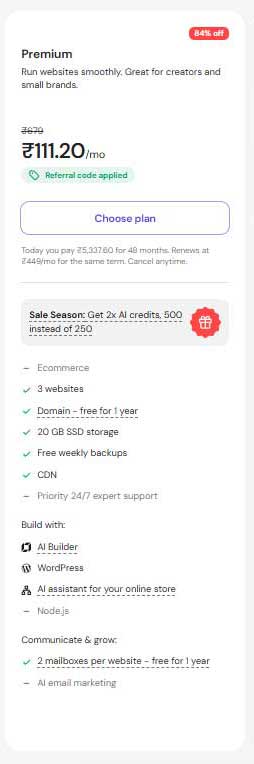
Note: The hosting prices and special discounts mentioned above are based on the offers available on October 31, 2026. These promotional offers are available for a limited time and may change from day to day. Actual prices, discounts, and renewal rates may vary depending on the current offer. Please check Hostinger’s official website for the latest pricing before purchasing.
Is Hostinger Premium Shared Hosting Good for WordPress?
Yes, you can use this hosting plan to run multiple WordPress websites.
For example, if you have three different domains, you can install WordPress separately on each domain.
Each website will have its own:
- WordPress dashboard.
- Themes and plugins.
- Posts and pages.
- Media library.
- Database.
You can manage all three websites through the same hosting account.
One thing I like about this setup is that you do not have to log in to different hosting accounts whenever you want to manage your websites. The hPanel dashboard provides access to your hosted websites in one place.
However, installing WordPress on three websites does not mean all three will have unlimited resources. They share the hosting environment, so resource usage matters.
Will Multiple Websites Affect Performance?
This is one of the most important things to consider before purchasing a shared hosting plan.
When you host multiple websites on one server, they share the available server resources. If one website starts using too much CPU, RAM, or other resources, the performance of other websites may also be affected.
For example, imagine you manage three WordPress websites. All three receive regular traffic, but one website suddenly starts getting thousands of daily visitors or uses resource-intensive plugins.
In this situation, you may notice slower loading times, website downtime, or resource limit warnings.
However, if your websites have optimized images, lightweight themes, and only necessary plugins, they can run smoothly on the same hosting account.
Therefore, the number of websites is not the only factor to consider. Traffic, CPU usage, RAM, plugins, database activity, and website optimization also play an important role in hosting performance.
When Is Hostinger Premium Enough for Multiple Websites?
The plan can be a reasonable choice if you manage a few small websites that do not require heavy server resources.
1. Personal Blogs
If you run two or three blogs with regular articles and moderate traffic, Premium can be a practical starting point.
2. Affiliate Marketing Websites
Affiliate websites generally contain articles, product reviews, comparison pages, and images. If your websites are properly optimized and do not receive heavy traffic, this plan may be sufficient.
3. Small Business Websites
A few business pages, service descriptions, contact forms, and portfolio sections usually do not require the resources of an advanced hosting plan.
4. New Website Projects
If you are experimenting with different website ideas, managing several small projects under one hosting account can help control your initial hosting expenses.
However, if your websites start growing, you should monitor their resource usage instead of assuming the same plan will remain suitable forever.
When Should You Upgrade from Premium?
There is no need to upgrade simply because you have added more than one website. You should consider a higher hostinger hosting plan when your websites need additional resources, storage, or features.
Here are some situations where upgrading may make sense.
Your websites receive more traffic: If your websites receive more visitors and start using more server resources, a higher plan may be worth considering.
You manage larger WordPress websites: Websites with complex themes, multiple plugins, large databases, or frequent background tasks may require additional hosting resources.
You need daily backups: Premium includes weekly backups, while higher plans offer daily backups. This can be useful if you frequently update your website.
You run an online store: If you want to build an online store, consider a plan with ecommerce features, such as Unlimited or Ecommerce Startup.
You need more storage: Premium includes 20 GB SSD storage, while Unlimited offers 50 GB NVMe storage and Ecommerce Startup offers 100 GB NVMe storage.
Before upgrading, compare the available features and resource limits of Hostinger’s higher plans to decide whether the additional cost is worthwhile.
My Experience Managing Multiple Websites with Hostinger
I currently manage two Hostinger accounts for my website projects. Working with multiple websites has helped me understand why hosting management and subscription planning are important.
One thing I personally like is the hPanel dashboard. It makes it easier to access website settings, manage domains, work with WordPress, and handle common hosting tasks without dealing with complicated server configurations.
When managing multiple websites, I also prefer keeping each project organized. Every website has its own purpose, content, plugins, and maintenance requirements.
My suggestion is to avoid installing unnecessary plugins and uploading large, unoptimized images. These small things can make website management more difficult as your projects grow.
I would consider Premium for a few smaller websites, but I would not choose a hosting plan based only on how many domains it supports. The available resources are equally important.
Hostinger Premium vs Unlimited vs Ecommerce Startup
If you are unsure which hosting plan to choose, compare the main features of Premium, Unlimited, and Ecommerce Startup before making a decision.
| Requirement | Premium | Unlimited | Ecommerce Startup |
|---|---|---|---|
| Websites | 3 | Unlimited | Unlimited |
| Storage | 20 GB SSD | 50 GB NVMe | 100 GB NVMe |
| Free Domain | 1 Year | 1 Year | 1 Year |
| Backups | Weekly | Daily | Daily & On-Demand |
| CDN | Included | Included | Included |
| Ecommerce | Not included | Available | Built-in |
| Online Products | Not specified | Ecommerce available | Unlimited |
| Transaction Fees | — | — | 0% |
| Priority Support | Not included | Included | Included |
The Premium plan is suitable for bloggers and users managing a few websites. Unlimited is a good option for users who need more storage, daily backups, and multiple websites. Ecommerce Startup is designed for businesses that want to build and manage an online store with ecommerce features.
The right choice depends on your website requirements, storage needs, and budget. You can also check the latest Hostinger hosting plans and pricing before purchasing.
Choose Hostinger Premium
Now that you have read the article and understand why this is the right choice for your website, if you have decided to purchase Hostinger Premium Hosting, simply click the button below to go directly to the payment page. From there, you can select a 12-month or 24-month plan (or another option), click the ‘Continue’ button, and complete the payment process.
Premium Web Hosting →Explore Other Hosting Plans
If you do not wish to purchase Hostinger Premium and prefer the Unlimited or Ecommerce Startup plan, click the button below. On the Hostinger pricing page, compare the available plans and click the Choose Plan button under your preferred option to continue to checkout and payment.
Unlimited & Ecommerce Plans →Final Thoughts: Is Hostinger Premium Worth It for Multiple Websites?
Hostinger premium web hosting can be a practical choice if you want to manage up to three small websites using one hosting account.
It works well for beginners, bloggers, affiliate marketers, and small business owners who do not need advanced server resources.
However, remember that all hosted websites share the resources available under the plan. If your websites receive more traffic or require additional processing power, you may need to move to a higher plan.
My recommendation is simple: If you are starting two or three small websites, Premium is worth considering. If you are building larger projects or expecting significant traffic growth, compare the higher plans before making a long-term commitment.
Choose hosting according to your actual requirements rather than paying for resources you do not currently need.
If your goal right now is to save money, you can opt for the hostinger premium plan. Should your needs grow later on, you can always upgrade to the hostinger ‘Unlimited‘ or ‘eCommerce Startup’ plan.