
Starting an online store is easier than it used to be. With WordPress and WooCommerce, you can sell products online without building an entire website from scratch. But before adding products and accepting orders, you need hosting that can handle your store properly.
Hostinger offers managed WooCommerce hosting with different plans for new and growing online stores. However, choosing the right one can be confusing, especially if you are starting your first eCommerce website.
In this guide, we will look at the available plans, their features, and the type of store each plan is suitable for. This will help you decide which Hostinger Hosting for WooCommerce option makes sense for your budget and business needs.
What Is WooCommerce Hosting?
WooCommerce is a free WordPress plugin that turns a normal WordPress website into an online store. You can use it to sell physical products, digital downloads, subscriptions, and other items.
However, an online store has different requirements from a regular blog. It needs to manage product images, customer accounts, shopping carts, orders, payment processing, and database requests.
That is why hosting matters.
WooCommerce hosting is designed to support WordPress-based online stores. It gives you the server resources and tools needed to manage your store, keep customer information protected, and handle visitors.
Hostinger also offers managed WooCommerce hosting, which includes features such as daily backups, SSL certificates, CDN, and support.
Which Hostinger Plan Should You Choose for WooCommerce?
Hostinger currently offers two main managed WooCommerce hosting plans in India:
- Unlimited
- Cloud Startup
Both plans support WooCommerce, but they are designed for different business requirements.
Who should choose this plan?
Cloud Startup may be suitable for:
- Established online stores
- Businesses with larger product catalogues
- Stores receiving regular traffic
- Businesses expecting higher customer activity
- Store owners who need more hosting resources
If your existing store is becoming more demanding, upgrading to Cloud Startup can give you more room to grow.
Hostinger Unlimited vs Cloud Startup: Which One Is Right?
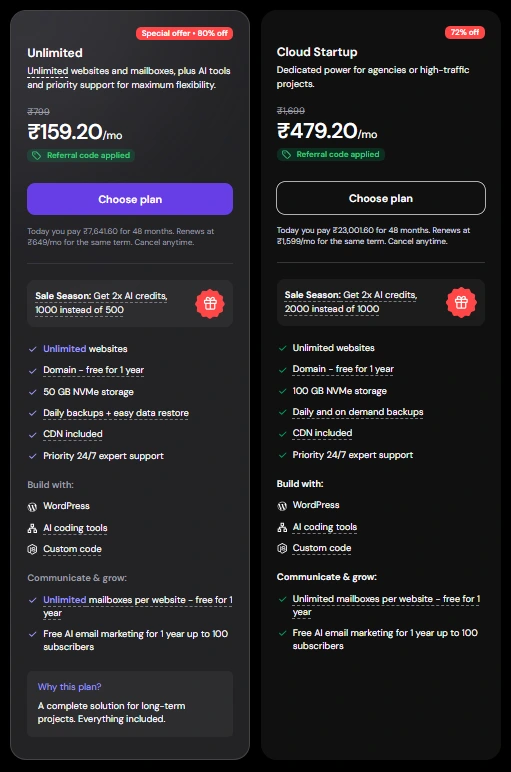
Hostinger Unlimited and Cloud Startup are designed for users who manage multiple websites, but they offer different levels of hosting resources. The Unlimited plan includes 50 GB NVMe storage, daily backups, and unlimited websites, making it suitable for bloggers, affiliate marketers, and small businesses.
Cloud Startup offers 100 GB NVMe storage, daily and on-demand backups, and cloud hosting infrastructure, making it a better option for larger websites, agencies, and projects that need additional resources.
If you manage a few small or medium-sized websites, Unlimited may be sufficient. However, if your websites are growing and need more hosting capacity, Cloud Startup is worth considering.
How Much Does Hostinger WooCommerce Hosting Cost in India?
Hosting prices depend on the subscription period and current promotional offers.
At the time of writing, Hostinger’s India WooCommerce page displays these promotional prices:
| Plan | Promotional price | Renewal price |
|---|---|---|
| Unlimited | ₹249/month | ₹649/month |
| Cloud Startup | ₹599/month | ₹1,599/month |
Note: Please keep in mind that the offers mentioned above are available for a limited time and are subject to change from day to day.
These monthly rates are based on a 48-month subscription. You pay the subscription amount upfront rather than paying month by month. Prices are shown before GST.
For example, the Unlimited plan displays a total of ₹11,952 for 48 months, while Cloud Startup displays ₹28,752 for the same period.
Do not choose a plan based only on its discounted monthly price. Check the total amount payable, renewal cost, subscription duration, and features before making your decision.
You can check the latest offers directly on the Hostinger WooCommerce hosting page.
Is Hostinger Good for a New WooCommerce Store?
Hostinger can be a practical option if you want to build a WordPress-based online store without managing a complicated hosting setup.
Its managed WooCommerce plans include several useful features:
Easy WooCommerce setup: You can get started with WordPress and WooCommerce without manually configuring everything from the beginning.
Free SSL certificates: SSL helps protect the connection between your website and visitors. This is particularly important for an online store.
Daily backups: Backups provide a recovery option if a website update, plugin issue, or other problem affects your store.
CDN: A content delivery network helps deliver website content through distributed servers, which can improve content delivery for visitors in different locations.
24/7 support: If you face a hosting-related problem, you can contact Hostinger’s support team.
These features make the hosting service worth considering, but remember that hosting alone does not guarantee a fast or successful online store. Your theme, plugins, product images, payment gateway, and website configuration also matter.
My Experience With Hostinger
I currently manage two Hostinger accounts and regularly use hPanel for website and WordPress management.
One thing I find convenient is having website-related settings and hosting management available from a central dashboard. It makes routine tasks easier, particularly when managing multiple websites.
However, my experience is mainly with Hostinger account management and WordPress websites. I have not personally tested a WooCommerce store under heavy customer traffic, so I would not claim specific store performance results.
If you are planning to start an online store, I would recommend comparing the available resources and renewal prices before choosing a long-term subscription.
A Few Things to Check Before Buying
Before purchasing Hostinger Hosting for WooCommerce, consider a few practical points.
Check renewal pricing: Promotional prices are usually lower than renewal rates. Make sure the future cost fits your budget.
Choose enough storage: Product images, videos, website files, and backups all need storage space. Think about how large your product catalogue may become.
Keep your website lightweight: Use a well-coded WooCommerce theme, optimise product images, and avoid installing unnecessary plugins.
Set up payment and shipping: Check whether your preferred payment gateway and shipping services are supported in your target market.
Maintain regular backups: Even when your hosting plan includes backups, it is sensible to understand how restoration works and keep an additional backup when making major changes.
These small steps can help you avoid problems as your business grows.
Final Thoughts
Choosing hosting for an online store does not have to be complicated. The right plan depends on the size of your business, expected traffic, and the resources your website needs.
If you are launching your first store, the Unlimited plan is a reasonable starting point. If your business already has regular customers and needs more server resources, Cloud Startup is worth considering.
Overall, Hostinger Hosting for WooCommerce offers two options for different stages of an online business. Start with the plan that fits your current requirements rather than paying extra for resources you may not need yet.
You can always review your hosting requirements as your store grows.
If you are planning to create a blog, business website, Hostinger is worth considering. Compare its hosting plans, check the latest discounts, and choose the option that fits your website requirements and budget.